Major catastrophic failure

My Scrivener files are a mess. Something happened with syncing that they are no longer opening on my iPad, and I’m afraid that if I open them up on my computer, the same thing will happen and all the versions will be corrupted (through a sync).

Photo by Polina Zimmerman on Pexels.com

So I’m going to have to make and move copies before I open Scrivener and see if I can transfer the moved files back in. Otherwise I’m not sure what I can do to de-corrupt too many files.

Wish me luck.

A Round-up of Writing (and Layout) Tools

I haven’t written about writing tools for a while. I haven’t written about them all in one place. Here’s a round-up of tools that take me from first draft to publication-ready. (Note for all my International readers — these are all English language programs):

Photo by RDNE Stock project on Pexels.com
  • Scrivener. This is the program I use to compose my writing. Think of it as a writing environment that organizes your work by chapters, allows a way to outline your work, take notes on it, set goals, and many other things. Even those people who compose using pen and paper will eventually have to transcribe their work on the computer, and this program is the one you want to use. Competitors in this function are programs like Storyist and online services such as Campfire. Skip those; use this full-featured program. You can find Scrivener here; they also have versions for your iOS gadgets.
  • ProWritingAid. ProWritingAid will point out your misspellings, your poor comma usage, and much more. I have learned many writing habits over sixty years, some of which I didn’t know were bad habits. For example, I sometimes use too many adjectives, rely heavily on adverbs instead of the perfect verb, or write subjects and objects that don’t agree. All of those grammar rules I failed to absorb in grade school come back to haunt me in my writing. ProWritingAid has matured my writing these past couple years, and I don’t regret getting a lifetime membership. You can find ProWritingAid here.
  • Atticus. Although you can use Atticus for composing your text, that’s not its strength unless you find Scrivener too complicated. Where Atticus shows its strength is in formatting for publication. You can import a Word document from Scrivener into Atticus, and give it proper page size, section breaks, and chapter titles. It takes a Word document and turns it into the look and feel of a proper book. You can find Atticus here.
  • Photoshop. As an indie author, I design my book covers. I use either stock photos (and pay for them) or original pieces by my talented niece (I pay for those as well). I need to design these into a 5×8 book cover with a front cover, a side spine with book information, and a back cover with a blurb and author information. Adobe Photoshop does this very well. There is a bit of a learning curve, because Photoshop has so many features that are beyond my skill set. But it also does what I need to do. Photoshop is expensive, so maybe you’d be better off hiring someone for cover production, but that adds up after a while. Here’s the link to Photoshop.
  • Amazon KDP. Publication platforms will depend on what publishing platform you wish your book to be on. I use Amazon KDP, which means I place my books on Amazon and occasionally other platforms. I find their interface pretty easy as long as I have done my due diligence on Atticus and Photoshop. The biggest challenge has always been tweaking my book cover to fit the number of pages/width of the book. Here’s a link to Amazon KDP.

Buying these at once can get expensive; I recommend prioritizing these and deciding based on your budget and needs. Scrivener only costs $60 US and KDP is free; the others are priced with annual fees and, often, lifetime purchases. In the US, these are eligible as work-related tax deductions if you are working to sell your books, so you save roughly 25% of your expenditure in taxes.

After publishing eight books (mostly the Kringle romances), I don’t know where I’d have gotten without these.

Twelve Years of Writing

I’ve been writing for twelve years. I started, strangely, three months after being diagnosed with bipolar 2, which I hadn’t realized till today. I know I didn’t start writing as a coping mechanism or as character insertion (my first characters were not me) and I didn’t write about being bipolar. I think I started writing because being treated for bipolar helped me focus on continuous tasks instead of pouring all my energy on the whim of the moment.

I was not a good writer at first — I wrote each chapter as if they were separate episodes, like short stories strung together. I didn’t feel like I wrote an overarching plot. The novels (I use the term loosely) I wrote then I have had to revise several times such that only the characters are the same. I learned a lot from revising them.

Things I have learned over the past few years:

Photo by Pixabay on Pexels.com
  • My first draft is not my novel. Over the years, the novels have needed less and less rewriting, but there are always things to fix in second and third (and fourth, and …) drafts.
  • Developmental editors are an important part of your writing toolbox. It is worth paying for them.
  • There are three ways to write a novel: Plotting, pantsing, and plantsing.
    • Plotting: an organized outline at the beginning, and following the outline.
    • Pantsing: writing it as one goes along, without the outline.
    • Plantsing: writing with a rough outline but pantsing through the chapters.
    • I am a plantser.
  • Scrivener is a great program for composing my work, especially plantsing.
    • Scrivener arranges itself around a chapter format and a synopsis form that I use to guide my chapters. I use it like pantsing with training wheels.
    • One can get templates for Scrivener novel-writing that incorporate plotting frameworks, such as Save the Cat and Romancing the Plot.
  • ProWritingAid was another investment I don’t regret — my grammar has improved in ways I hadn’t considered before. I have lessened my passive verb structure massively.
  • Writing is the easy and fun part. I still don’t think I have the hang of promotion (and this blog is part of my proof of that.)
  • My favorite novel is always the one I just finished.

The most important thing I learned? That I can write. The second? That there’s a whole lot of luck in being discovered, and luck hasn’t come to me quite yet.

I feel like I could have learned more in 12 years, and maybe I have, but these are the biggest things I can think of. I hope they’re helpful to someone!

Aeon Timeline Review

I have a somewhat tenuous relationship with time, and nowhere does it show up more than when I’m writing. Even though I write fast-paced plots that run over a few weeks or a month, I lose track of the time and suddenly two different plot points are happening at the same time.

I used to sit with a calendar and make notes on the Scrivener file, chapter by chapter, but then I didn’t get the full picture; I had no one document where I could look at the whole timetable. And flipping back and forth between chapters makes it hard to remember the sequence.

Then I discovered Aeon Timeline, a program that helps you organize a timeline by chapters or individual events, characters involved, and other potentially important characteristics. It organizes itself around two concepts: events and entities.

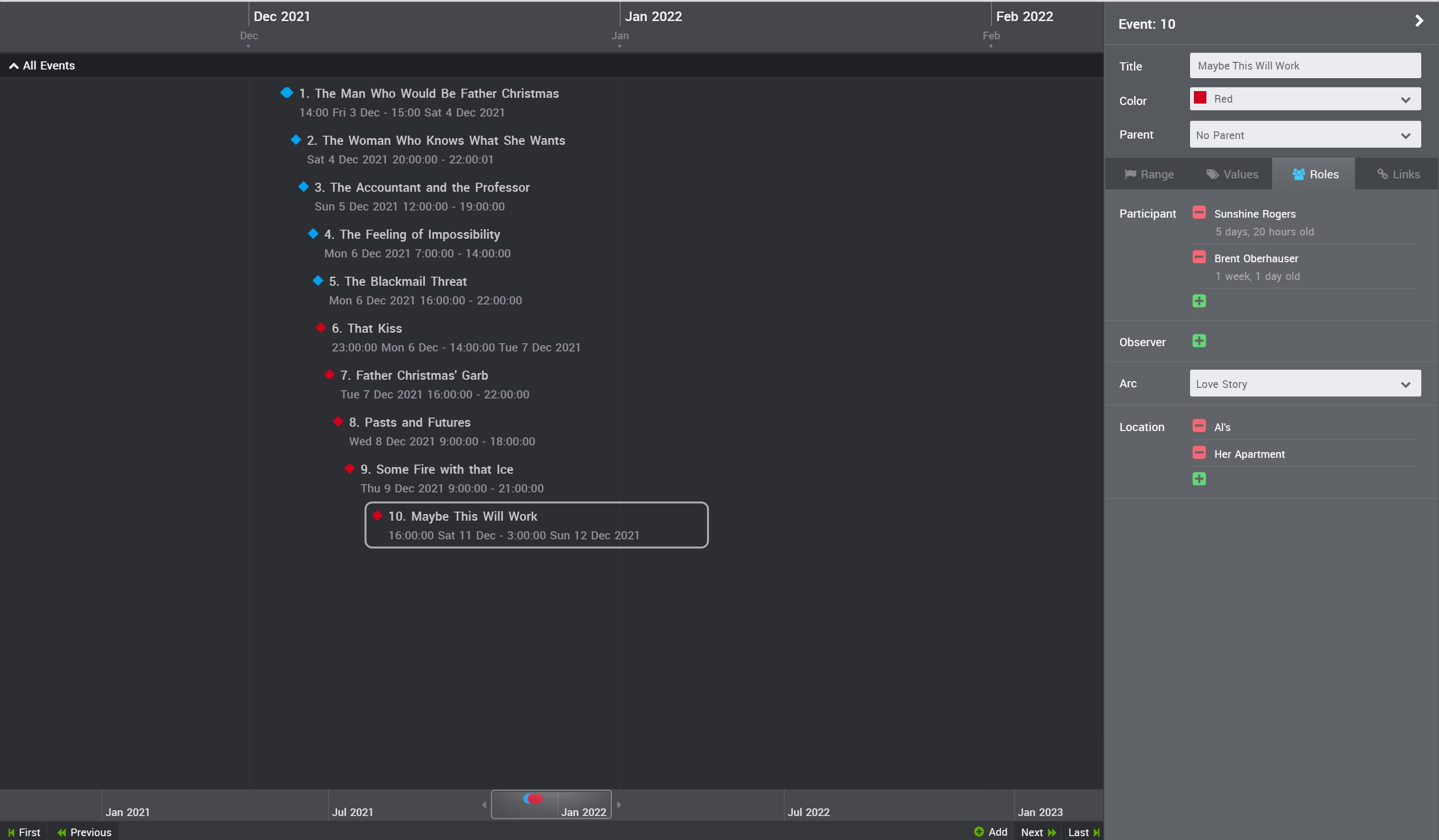
Here is a screenshot of my current project:

On the left, you can see the timeline. In my case, it’s color-coded to match a template I have for romance writing. On the right, you can see an event (the one highlighted on the left). On the event side, you can see at the top the event data — title, color, and parent. I do not use ‘parent’ because it ties everything to a preceding event and my mind doesn’t function that way. Below that to the right there’s data such as participants and observers, story arc, and location. Those are used as sorting prompts, and I haven’t found myself gravitating toward that function yet.

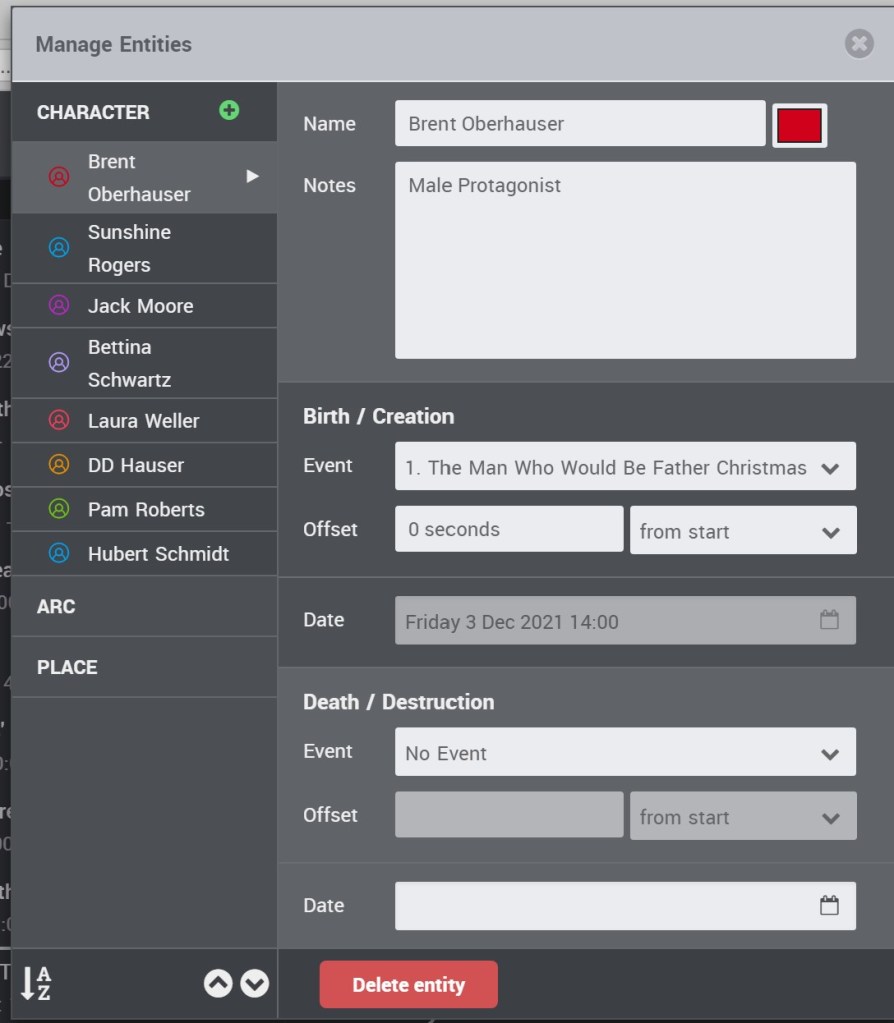
Below is what the ‘entity’ window looks like:

This is the ‘manage entity’ window. You can add entities here (to add anywhere, click a ‘plus’ button) and edit them. I recommend using this box rather than the ‘add entity’ box because you can manage things better here. Note on the left the window will also let you define story arcs and enter different places.

Notice I don’t use the birth/death blanks because I’m not writing epic fantasy. If I ever make the unified timeline for all my novels, I could use that. (But it would be an unwieldy timeline spanning 6000 years.)

The good thing about Aeon Timeline (to me) is that I can see that timeline, and in making it, I can ‘feel’ that timeline. I often make it after writing the book in my proofreading stage. This is probably the wrong way to use it. If I set it up before, I could actually import it into Scrivener (my writing software) and the timeline would show up. Somewhere. I have to try that.

The bad thing about this is all the data entry. I feel possessed to put in all the entity data and use all the categories when developing the event, and this can be a lot of work. Being a plantser (planner/pantser) writer, I don’t know that I would know all the events before using this tool such that I could use it at the beginning. I would advise to enter what is needed and leave the other bells and whistles alone.

I’m halfway through entering my Christmas romance for the year, Kringle in the Night, as I edit it one more time to make it ready for the Christmas season. It’s helping greatly. I’ll let you know about the Scrivener integration later.

No Excuses Today

I can’t avoid writing any more.

I had excuses the past couple days — “I’m tired from writing my final”; “I’m tired from driving down to Kansas City and back to visit my intern” — good excuses, both of them, But, honestly, I need to get back into the scheme of things.

Another excuse I’ve made to myself is that I’m used to working at the cafe, because it’s out of the house, it’s novel yet familiar, and there’s coffee (admittedly there’s coffee at home, but it takes work). I haven’t been able to work at the cafe lately because of the need for two screens at this point in editing. I need one screen to look at the  marked-up Word copy of Prodigies and the other to make changes to the Scrivener copy (I keep my work on Scrivener because I can print out manuscripts and the like as needed.) We have an office, a claustrophobic affair with two big screens, but it’s easier to avoid working there because I can quit right after I’ve started without having to pack up, pay my tab, and drive home. (Those items are disincentives to leaving, believe me.)

Richard got the idea to utilize my old (and unused) iPad as a second screen for mobile editing. It’s a great idea, as it turns out — even though the screen is small, it will show enough information for me to work with. The software to do this, which must be installed on both the iPad and the PC, is called Duet Display and the details are here: Duet Display

So I have no excuses today. I only have a meeting in the morning, and then I’m free. I have a system to work with to help with the dual display need, and I have a place to go.

Now to steel myself to the fact that I need to stack all chances against the poor residents of Barn Swallows’ Dance and kill a few. 

****************

Note: I have gotten a couple of rejections since yesterday, but I’m okay with it. They weren’t big things, and one of them was hastily written to meet a theme. I’m still waiting on big stuff.

Fresh Eyes

(Note: Polish reader, if I email you some Polish dialogue translated by Google Translate, will you tell me if it makes any sense to you in Polish? It would also help if you could give me the corrections.)
*********

Yesterday I discovered the marvel that is looking at a Work in Progress with fresh eyes. 

After work, Richard and I spent time at the local corporate coffeehouse to play with ideas for NaNo. The neutral walls are plastered with glossy posters of their wares and perky, pithy sayings in vinyl decals made at the home office. I prefer independent coffeehouses with their quirky rustic walls and hand-chalked menus paying homage to local institutions, but the nearest one is 45 miles away.
This story starts with the fact that I have two computers, and one of them is more likely to travel with me. I discovered I couldn’t get access to Whose Hearts are Mountains because it was open in Scrivener at home, a feature to prevent conflicted copies on two different computers.
So, as not to waste valuable coffee time, I pulled up the document I set aside to start a new novel for NaNo. That novel is Prodigies, and I was almost halfway done when I shelved it. Plotwise, that was the easier half, although I think my protagonists spend too much time running and I may have to go back and fix it.
When looking at it with fresh eyes, however, the questions began rushing through my head: “What if the mind control was a distraction? What if the little girl had her father’s healing talent and could use it in reverse? What is the implication of doing this to a young girl?” This could raise the stakes of the plot — who could you kill at the UN General Assembly meeting that would reduce the world to an exploitable chaos? 
I also found two resources I hadn’t been able to find before — the floor for the UN Assembly Building and the UN Assembly schedule, which will make writing this story much easier.
I may have learned a valuable lesson here — sometimes putting something away for a while works better than beating your head against it. Lesson two — work on more than one idea at a time.

Prepping the Next Story Part 1

I will be writing for NaNoWriMo this November. I think I explained this phenomenon before, so jump to the next paragraph if you’ve read this before: NaNoWriMo is a worldwide writing committment, where the participants commit to 50,000 words — which is well on the way to finishing a novel. In thirty days, 50,000 words equals 1,667 a day.

I started participating in  NaNoWriMo because I’ve been known to easily abandon hobbies and free time activities. It runs in the family — my mother had an attic full of bolts of material, often purchased on sale, and scraps of velveteen and brocade that she planned to use someday for a Project. Mom’s projects, like mine, were never small,  and like me, Mom expected to start a project at expert status. As an illustration, the scrapbook for my wedding sits unfinished, and Richard and I just celebrated our tenth anniversary.

NaNo changed that for me — primarily because it gave me a Big Audacious Goal. I could say “I’m going to write a 50,000 word book” to my friends and they’d say “OOOOH!” And then, having committed to the goal, I had to actually write it to save face. And then, at the end of the month, I had a book I had to take seriously and start learning how to edit — that, as you know, has taken a while. And now I have the discipline to write over and over.

This year for NaNo, I’m going to start writing the “dirty commie gypsy elves” book that I’d conceptualized twenty-five or so years ago, which has neither gypsies or elves, nor are they dirty.
How do I start?

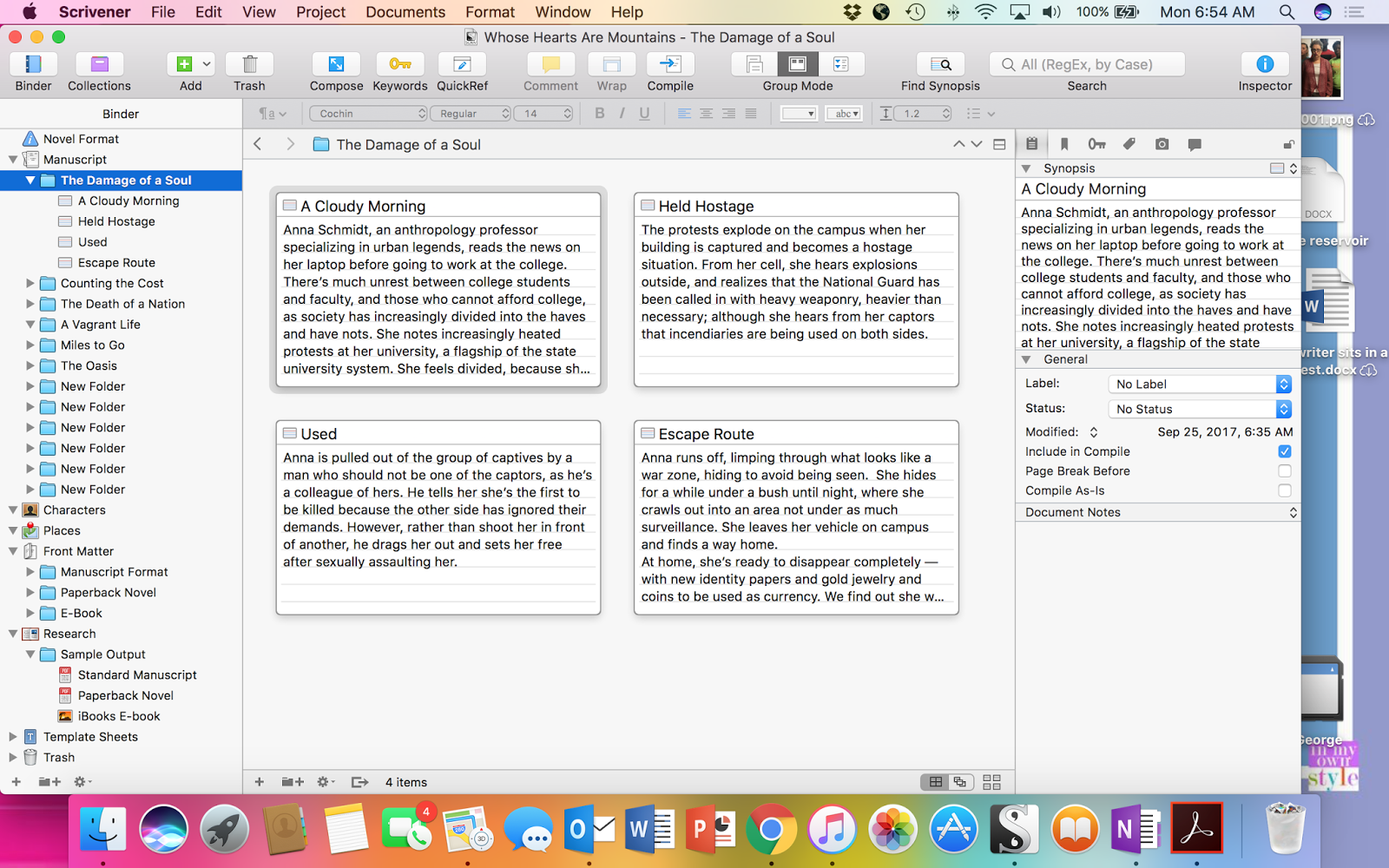
I’ve done this before — I start with a loose outline of major plot events, which looks like this:

On the left-hand side at the top is the outline for the book. I have the chapters added, with six titled, and the first chapter with its subchapters named and visible. The cards in the middle are the synopses for each section.  There are some commands at the right I will set up later.

That’s what I will be doing for the next couple of days, so that my book has some time to percolate in my mind in October after I edit another book.   Wheeeeeeee!

Character Sheets and Why You Need Them

One of the best ways to keep your characters from becoming one big blur such that you can’t tell the difference is the character sheet. I have seen character sheets developed in a notebook in colored ink (What’re you up to these days, Ashley?), as templates for Word, or in software programs such as Scrivener.

At the very least, a character sheet for each main character will help you remember their traits and how they affect the story. Otherwise, it’s entirely possible to have one of your characters fall out of — well, character. For example, one of the themes in my writing is how pacifism has always been a minority position in the US. Therefore I have a lot of pacifistic characters living at the ecocollective that houses many of my novels, and other characters who are not pacifists but have agreed to non-violent rules to live in the collective. And then there’s Gideon, who was brought up by a Quaker mother, but couldn’t resist throwing a punch from time to time. I have to remember which ones are which to be consistent; thus, character sheets.

Character sheets also keep authors consistent from book to book. Case in point: One of my favorite books, one that makes me happy-weepy to read, is Tea with the Black Dragon, by R. A. MacAvoy. One of the protagonists is Oo Long, a mysterious Eurasian man who is more than he seems. Without giving away the plot, Oo Long, besides being the name of a tea, translates to “Black Dragon”.  One of my least favorite books is Twisting the Rope, the sequel to Tea with the Black Dragon. My reason for disliking the latter book is because the character of Oo Long changes drastically with no explanation. In fact, his skin is described as “black” in the latter book. At the very least, the author needs to explain why a protagonist has changed color.

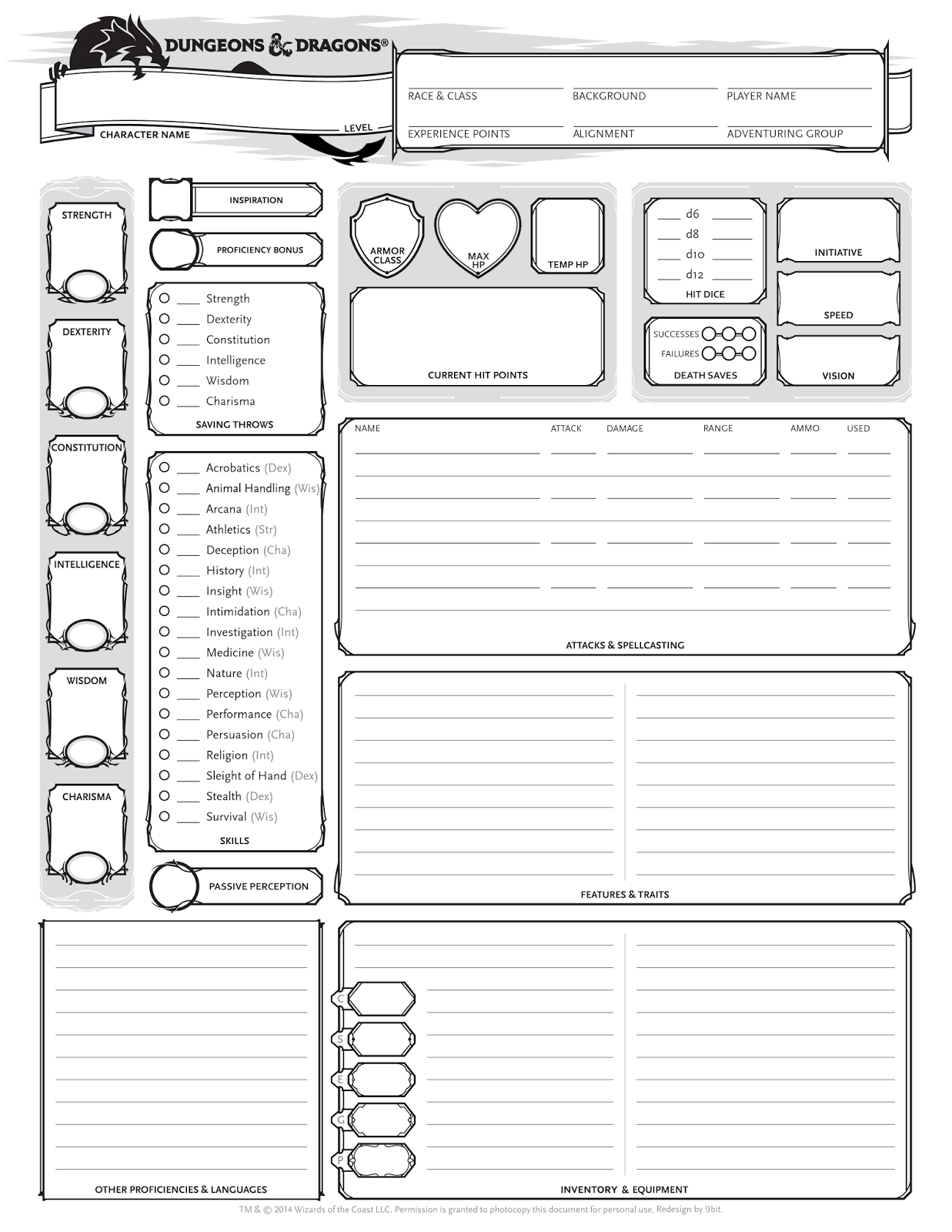
The first time I saw a character sheet was 30-some years ago, long before I started writing novels. It looked much like this: (Dungeons and Dragons, 2017).

Sorry for the mouse print. Anyone who has played an RPG recognizes this sheet, or something much like it.  (My character was a female half-elf wizard with extreme beauty and maxed-out charisma. Hello, wish fulfillment!)

More pertinent to the discussion — this character sheet does a pretty good job for writers despite its obsession on quantifying character skills and its focus on fighting. I could see this working for sword and sorcery or even urban dystopia with fight scenes.

This next one I looked up on the Internet, a veritable treasure trove of character sheets. I love this sheet:

This sheet has so much detail, it would almost work as an intake assessment form in case management — all it’s missing is the mental status exam. I think I could use this form while discussing with my husband the fine points of a character over a three-hour coffee date. On the other hand, I have a novel with 65 characters, for which I have at least partial character sheets. Imagine filling this doc out for 65 characters!

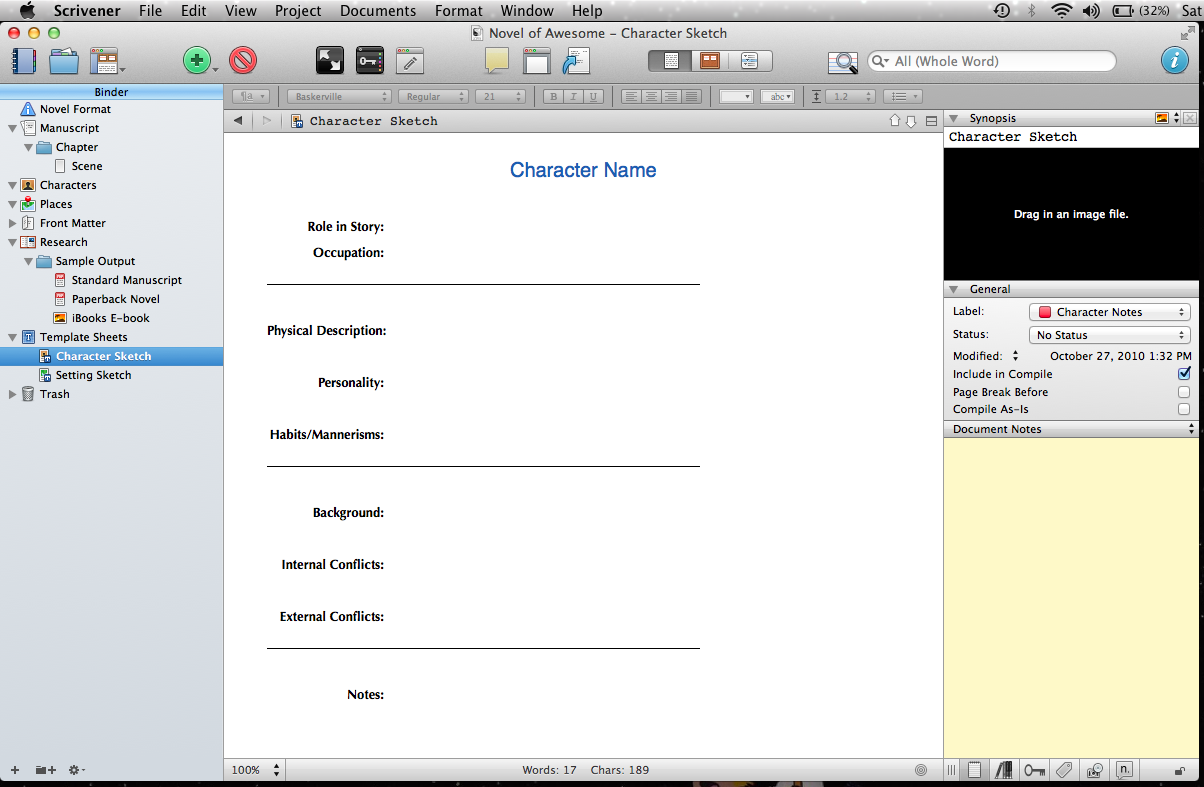
The third character sheet is what I use, because it’s electronic and because it’s bundled with my storywriting/formatting software, Scrivener:

I prefer the simplicity of this document — I can fill this out in 20 minutes or less and get back to writing. My favorite part of this document, however, is that I can drag and drop a picture to remind me of what the character looks like!

If you were to ask me, though, which character sheet/method is the best, I would not answer with Scrivener’s document, although it’s my favorite so far. As with many other things in life, the best character sheet is the one you’ll use.

As always, sources:

Dungeons and Dragons (2017). Character sheets. Available: http://dnd.wizards.com/articles/features/character_sheets [September 6, 2017].

Lerner, T. and Walker, K.  (2017). The epiguide.com guide to character sheets. Available: http://www.epiguide.com/ep101/writing/charchart.html

Scrivener [Computer software]. (2017). Retrieved from https://www.literatureandlatte.com/scrivener.php.